Stellanza
Online RSVP for weddings

Online wedding RSVP: guests reply from one link

Each guest opens a link on their phone, says whether they are coming, picks a meal, adds dietary notes and names their plus-one. There is no app to install and no account to create. Every reply updates your guest list straight away, so you always know who is coming, who has declined and who still has to answer.

Free with unlimited guests. No card needed.
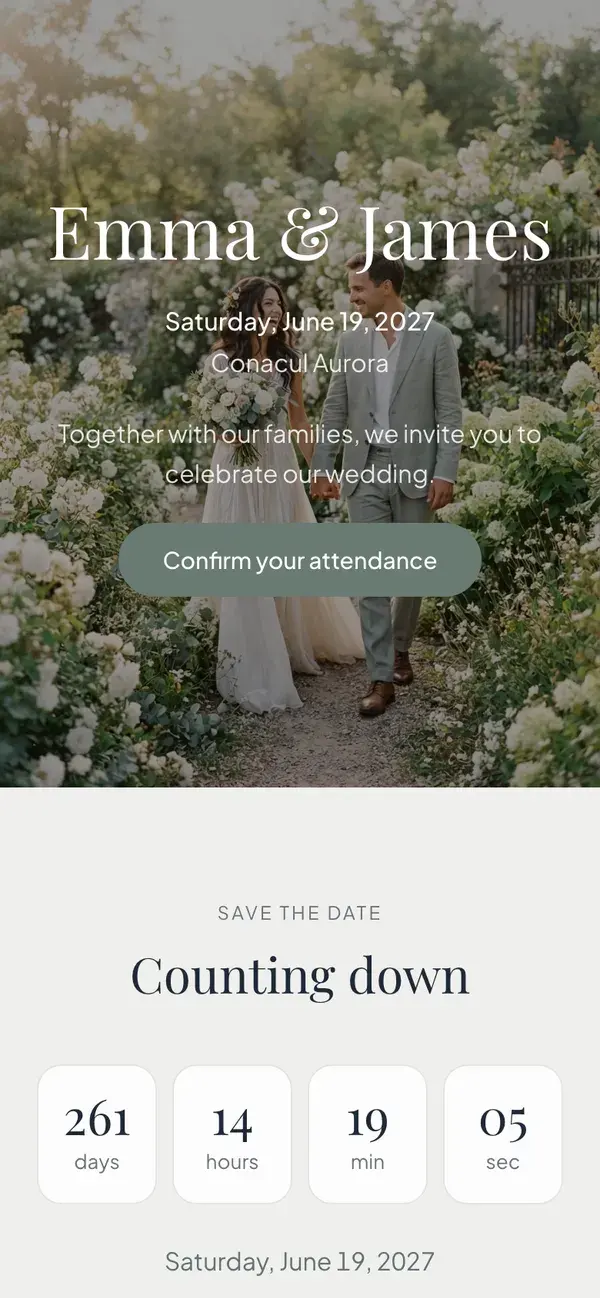
A Stellanza wedding page in the Classic design, open on a phone

How online RSVP works in Stellanza

  • Every guest gets a personal RSVP link, or you share one link and guests find themselves by name.
  • The form asks if they are attending, their meal, dietary notes and the names of any plus-ones; you choose which questions appear.
  • Guests reply in the browser on any phone, with no app and no account, and can open the same link again to send a new answer.
  • Each reply sets the guest to Attending or Declined on your guest list, and you get an email when someone answers.
  • RSVP links, the form and unlimited guests are free; Premium adds five more page designs, one payment per wedding.

How it works, in three steps

  1. 01

    Add your guests

    Type them in or import a CSV. Each guest gets a personal link, and the wedding gets one shared link as well.

  2. 02

    Send the link

    Send each guest their link on WhatsApp from the guest list, with your own message, or post the shared link in a group chat.

  3. 03

    Watch the replies arrive

    Answers, meals and plus-ones appear on your guest list as they come in. Set a deadline and the form closes on that date.

What your guests see

Your wedding page, with the reply form at the bottom. It opens in the browser on any phone and takes a minute to fill in.

  • Accept or decline in one tap
  • Choose a meal: standard, vegetarian, vegan or gluten-free
  • Write allergies and other dietary notes
  • Add plus-ones by name, each with their own meal, if you allow them
  • Open the same link again to send a new answer
The reply form, with the labels your guests see in the app.
Your guest list after the first replies, with the app's own labels.

What you see

Your guest list, kept up to date by the replies. The counts at the top tell you where you stand without adding anything up.

  • Totals for invited, attending, pending and declined
  • Every guest's status and meal, ready for the caterer
  • Plus-ones added to the list as guests of their own
  • Replies from the shared link held for your approval
  • Filter by Pending and send those guests their link again
  • Export to CSV, then seat the confirmed guests on your table plan

What is free and what is Premium

Collecting RSVPs never costs anything. On the RSVP page, Premium only changes how it looks.

Free

  • Unlimited guests
  • Personal RSVP links and one shared link
  • Meal, dietary notes, plus-ones and a deadline
  • Your wedding page in the Classic design
  • Replies on your guest list, CSV export and the seating plan
Start collecting RSVPs, free

Premium

  • Five more designs: Botanical, Editorial, Heritage, Minimal and Evening
  • More colour palettes and font pairings

$35, one payment per wedding. No subscription.

Compare the plans

Questions couples ask

Do guests need an app or an account to RSVP?
No. The link opens in the browser on any phone or computer. Guests fill in the form and send it; nothing to install, nothing to sign up for.
Can I send the RSVP links on WhatsApp?
Yes. From the guest list, a WhatsApp button opens a chat with each guest and fills in your message with their personal link. You can also copy the link, or post the one shared link in a group chat.
What happens if someone who is not on my list replies?
On the shared link, a guest who cannot find their name can still say they are coming. The reply is marked Pending review on your guest list until you approve it.
Does Stellanza send reminders to guests who have not replied?
Not automatically. Filter your guest list by Pending to see who has not answered, and send them their link again on WhatsApp in a couple of taps.
Is online RSVP free?
Yes. Personal and shared links, the form with meals, dietary notes and plus-ones, the deadline and unlimited guests are all on the free plan. For RSVP, Premium only adds more page designs, colour palettes and font pairings.

Send your first RSVP link today

Add a few guests, send their links, and watch the answers fill in your list. It is free, with unlimited guests.